
A common question is: should I use hashtags on Pinterest pins? Well, at WordPin we noticed a shift on Pinterest over the past year, and the engineering blogs coming out of the company confirm what many of us have suspected: Pinterest hashtags are becoming functionally obsolete. Pinterest did not disable them, rather, it’s because the way Pinterest’s machine learning systems understand content beyond simple text matching.
The Embedding Revolution: How Pinterest Actually “Sees” Your Content
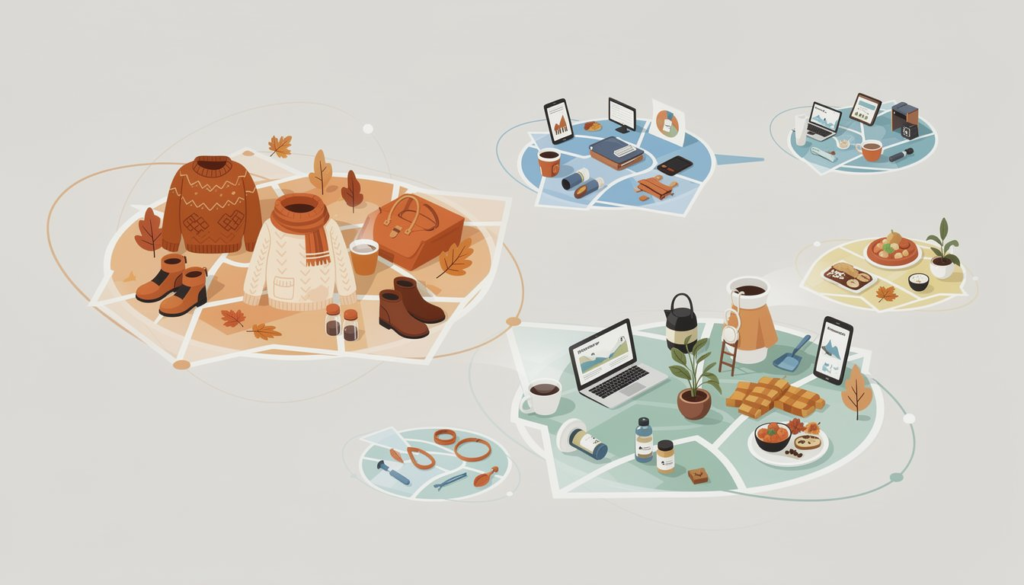
When you upload a pin with a title, description, board name, and maybe some hashtags, you and I think in keywords/words and phrases. However, Pinterest converts all of that into embeddings, which are numerical representations in high-dimensional space where semantically similar concepts cluster together.
What are embeddings?
Embeddings are like coordinates on a map where similar things sit close together.
“Fall fashion,” “autumn outfits,” and “cozy sweater looks” all land in the same neighborhood of this mathematical space, even though they use different words.
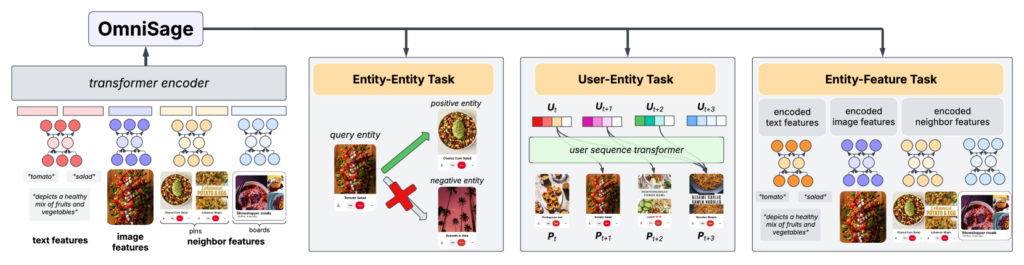
Pinterest’s OmniSearchSage system, deployed across their entire search stack, serves about 300,000 requests per second. It creates embeddings for queries, pins, and products. These embeddings capture context, visual content, user engagement patterns, and the relationships between concepts to get a complete idea about what your pin is about.
When you type “fall outfit ideas” into Pinterest, the system projects your search query into the same embedding space where all pins live, and finds pins that are semantically similar even if they never used those exact words. Taking the example of a map, it’s like making a pin about Germany, written in german. It will most likely be placed where Germany is since it matches that “section” of the map.
DID YOU KNOW? Pinterest’s annotation system can extract and score relevance for 1-6 word keywords from multiple sources including pin titles, descriptions, board names, linked page content, and even objects detected in images using visual classifiers. The system processes around 100,000 terms per language.
The same thing happens with hashtags. If your pin description says “cozy autumn fashion inspiration” and you add #falloutfitideas as a hashtag, Pinterest’s embedding models already understand these concepts, and they map to the same semantic space. This means that the hashtag becomes redundant information, and it adds nothing new to the data that Pinterest already scores.
But Doesn’t It Help If I Repeat My Main Keyword With Hashtags?
Short answer….No, it does not. And here’s why:
Pinterest’s embedding models (like those in OmniSearchSage) don’t work through simple word counting or TF-IDF weighting. They’re transformer-based architectures trained to create semantic representations. The embedding for your entire pin is generated from the context and meaning of all text combined, not from frequency counts.
Think about this: the embedding captures “this pin is about vegan recipes” as a position in mathematical space.
Whether that concept appears once with rich context (“these vegan dessert recipes use whole food ingredients and take under 30 minutes”) or twice with one instance being contextless (“#veganrecipes”), the embedding still represents the same core concept.
What does affect embedding position and relevance scoring is:
- Contextual richness: Related terms that paint a fuller picture (ingredients, techniques, occasions, dietary needs)
- Multi-signal alignment: Visual content showing desserts, board name reflecting vegan cooking, engagement from users interested in plant-based recipes
- Semantic relationships: Words that help Pinterest understand the specific type/style of vegan recipes you’re sharing
WordPin makes Pinterest-relevant copies with keywords-enriched Pin titles and descriptions,
optimized for your topic/keyword to tell Pinterest what your pin is about.
Start your 7-day FREE trial with 200 credits to test it out!
The Embedding Space Insight: Why Redundancy Fails
Here’s the technical explanation for why hashtag text that already exists in your copy adds nothing: Pinterest’s text embeddings learn representations where “fall outfit ideas” and “#falloutfitideas” project to nearly identical locations in embedding space. The models are trained on massive text corpora where words appear in varied contexts, and they learn that these represent the same concept.
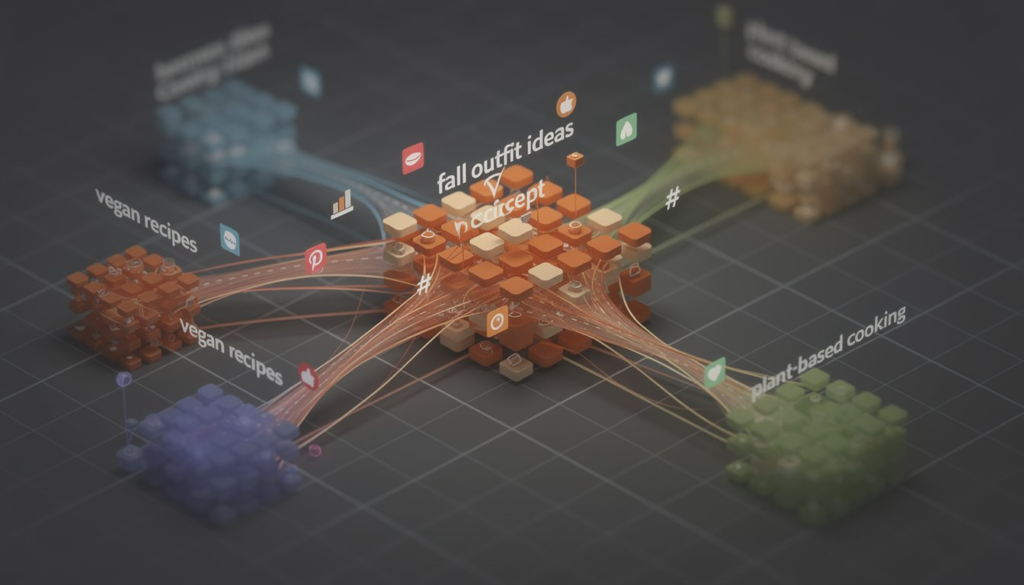
Understanding embedding space redundancy: Imagine Pinterest’s system as a library where every concept has a location. “Vegan recipes,” “#veganrecipes,” and “plant-based cooking” all get filed in the same section because Pinterest understands they mean the same thing. Putting multiple labels on the same concept doesn’t help—Pinterest already knows where it belongs.
When both appear in your content, Pinterest’s system sees the same signal twice. You’ve used character space that could have provided additional context, related concepts, or specificity that would genuinely help Pinterest understand your content better.
This differs fundamentally from how hashtags worked on early social media platforms. Twitter used hashtags as explicit categorization because the platform had no sophisticated NLP or computer vision. Instagram used hashtags for discovery because their search and recommendation systems were primitive. Those platforms built around hashtags as organizational structures.
Pinterest built around visual discovery and semantic search from the beginning. Hashtags were grafted on later as an experiment, but they never became core infrastructure the way they did on Instagram or Twitter. Pinterest’s current systems—embeddings, annotations, taxonomy, multimodal understanding—represent the platform’s native language.
DID YOU KNOW? Pinterest’s OmniSearchSage system serves 300,000 requests per second using unified embeddings that understand queries, pins, and products in the same mathematical space. This means your content competes for visibility based on semantic relevance, not keyword matching.
Pinterest’s Text Understanding: Annotations vs. Hashtags
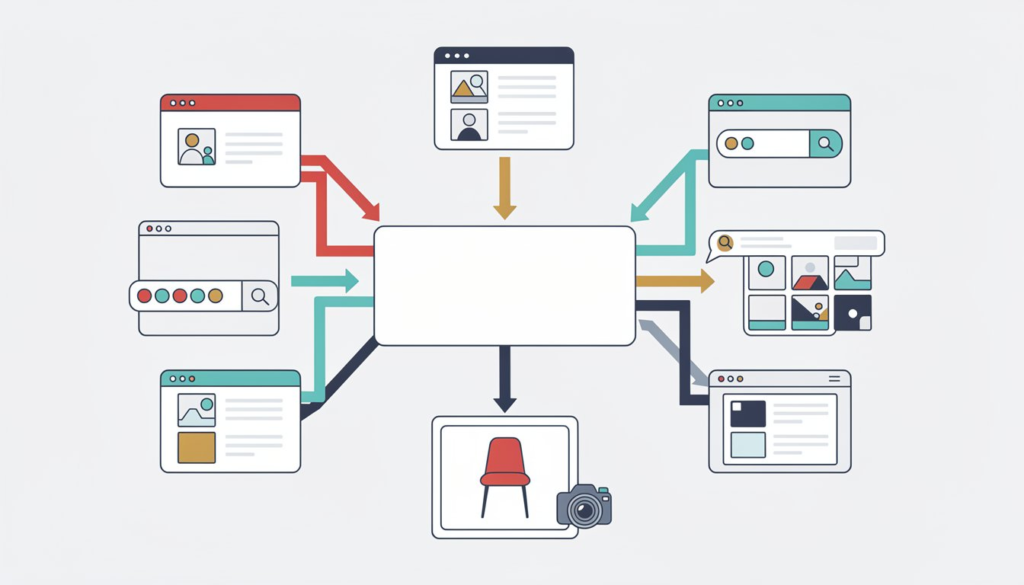
In 2019, Pinterest engineers published details about their annotation system. It told us that Pinterest pipeline that extracts keywords from six different text sources: pin title, pin description, pin URL, board name and description, linked page title and description, and historically high-engagement queries. Visual classifiers also contribute detected objects they detect in your images.
These annotations are scored for relevance using something called gradient-boosted decision trees, trained on 150,000 crowdsourced labels per language. Annotations serve as fundamental signals across Pinterest’s product surfaces, powering ad CTR prediction, home feed ranking, related pins generation, search retrieval and ranking, and content safety filters.
Gradient-boosted decision trees are machine learning models that combine hundreds of simple yes/no decisions.
Each new rule corrects mistakes from previous ones.
Pinterest uses them to score how relevant each extracted keyword is to your pin.
How annotations work: Pinterest’s natural language processing breaks down your text into meaningful keywords, normalizes variations (like “running” and “run”), and matches them against a dictionary. Each keyword gets a relevance score based on how well it represents your content.
Pinterest hashtags are processed just like any other text. Pinterest’s NLP tokenizes them, normalizes them, stems them, and matches them against the same dictionary. If the text of your hashtag appears elsewhere in your pin copy or board name in a contextually appropriate way, the hashtag adds nothing new to Pinterest’s understanding.
“Annotations are fundamental signals used by multiple product surfaces on Pinterest. They can describe the aesthetics, emotions, object types, brands, occasions or locations relevant to a Pin, in addition to many other concepts.” — Pinterest Engineering Team
Pinterest’s annotation extraction looks at multiple text sources because context matters. Hashtags are just another source, and often the weakest one, because they lack surrounding context that helps the model understand proper relevance.
The Pin2Interest Taxonomy: Where Your Content Really Lives
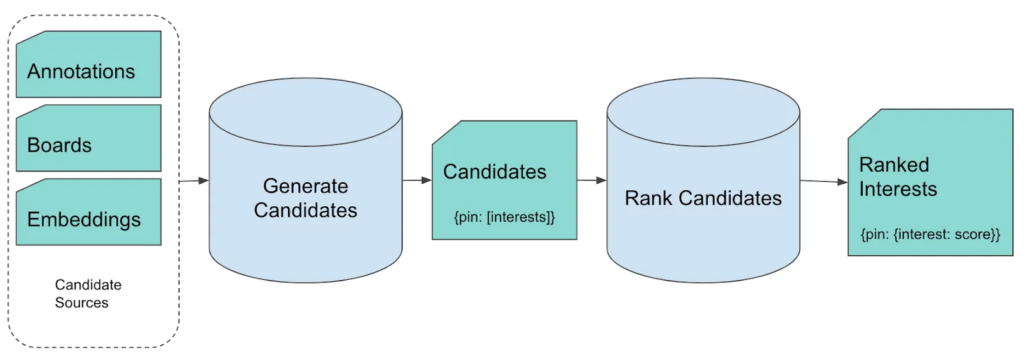
Pinterest organizes content into a hierarchical Interest Taxonomy with 10 levels of granularity, starting with 24 top-level concepts like “Women’s Fashion” and “DIY Crafts” and expanding to tens of thousands of specific interests. The Pin2Interest (P2I) system maps over 200 billion pins to this taxonomy, achieving classification for more than 99% of pins.
What is taxonomy classification?
Pinterest categorizes every pin into specific interest buckets so it knows who to show your content to.
If you create a vegan dessert recipe, Pinterest needs to understand it belongs in “Food & Drink > Desserts > Vegan Desserts” to show it to the right audience.
P2I works through candidate generation followed by ranking. During candidate generation, Pinterest uses lexical expansion to find precise text matches, then expands the net through pin-board co-occurrence analysis. The ranking stage scores each pin-interest pair using features like embedding similarity (both text embeddings like FastText and pin embeddings like PinSage), TF-IDF features from annotations, taxonomy hierarchy features, engagement metrics, and contextual attributes.
WordPin’s Pin Taxonomy Map tool helps users see what taxonomies they covered,
and which ones they are missing.
Efficient use of Pinterest’s taxonomies helps Pinterest better understand and place your pins.
Start your 7-day FREE trial with 200 credits to test it out!
This taxonomy system is why board names matter more than most creators realize. Boards serve as semantic anchors that help P2I models place your content within the interest graph. When your pins consistently appear on themed boards with clear, specific names, Pinterest gains confidence about where that content belongs in the taxonomy.
DID YOU KNOW? Pinterest processes your content through multiple machine learning models simultaneously. Your pin exists as a visual embedding (from the image), text embeddings (from all text sources), engagement embeddings (from user interactions), and taxonomy mappings. All of these signals feed into ranking models that determine when and to whom your content appears.
Hashtags don’t participate in taxonomy mapping in any special way. They get processed like all other text. If “#veganrecipes” appears in your hashtag but “vegan recipes” doesn’t appear naturally in your pin description or board context, Pinterest might extract it as an annotation—but it will be scored lower because it lacks the contextual support from other text sources that typically indicate relevance.
Why Pinterest Hashtags Worked Before (And Why They Might Not Work So Well Now)
Between 2018 and 2020, Pinterest experimented with hashtags more explicitly. The platform was smaller, the machine learning models were less sophisticated, and hashtags provided a useful categorization signal when other signals were weak.
Pinterest’s infrastructure has grown hugely since then. It now uses Large Language Models (LLMs) for search relevance, combining pin titles, descriptions, captions from generative vision-language models, link-based text, historically engaged queries, and user-curated board data to predict relevance. These models are trained on billions of logged search interactions and measure relevance on a five-level scale.
Visual search experiences like Lens and object detection are used millions of times each month. Pinterest’s Complete The Look technology uses deep learning to understand style compatibility and recommend complementary items. Shop The Look detects fashion items within images and suggests matches that you often find within your seaches.
The system has moved from simple keyword matching to understanding user intent, visual semantics, style relationships, and user behavior patterns. Hashtags represent an older paradigm. Pinterest’s current approach is implicit categorization through multi-signal machine learning that understands what your content is about without you having to declare it with metadata.
“We built the Pin2Interest (P2I) system to address the Pin classification needs at Pinterest. P2I supports all types of Pins with a single, scalable, and reusable model that can assign over 5,000 Interests to more than 200 billion Pins with close to 100% coverage.” — Pinterest Engineering Team
Multiple practitioner tests in 2025 found that keyword-focused pins can improve reach by up to 70% compared to hashtag-forward posts. And that may be because time spent optimizing hashtags is time not spent writing clear, contextually rich descriptions that actually help Pinterest’s models understand your are doing.
The Multimodal Future: Visual Embeddings and Text Together
Pinterest’s latest research points toward even deeper integration of visual and textual understanding. Visual Language Models and multimodal embeddings now power Pinterest’s core discovery systems. That is how it can analyze patterns, colors, textures, objects, and context within images, creating visual embeddings (just like the embeddings that we described before, but they also include images) that cluster similar content.
In May 2025, Pinterest announced expanded visual search capabilities using multimodal embedding models that combine text and images in single queries. Users can long-press any pin to initiate visual search, and the system generates text augmentation suggestions automatically.
This multimodal approach fundamentally changes content classification. As I explored in my Pinterest Performance Triangle framework, your pin exists simultaneously across multiple dimensions: visual content, taxonomy placement, and copy quality. All of these signals feed into ranking models that determine when and to whom your content appears.
DID YOU KNOW? When Pinterest’s visual classifier already sees “golden retriever puppy” in your image, and your pin description says “adorable golden retriever puppies playing in autumn leaves,” and the board is titled “Cute Dog Photos,” adding #goldenretriever provides zero additional signal to Pinterest’s understanding of your content.
Blocks of hashtags can hurt readability and create patterns Pinterest associates with low-quality content or spam. The platform’s quality signals look at user engagement, save rates, click-through rates, and time spent viewing pins. Content that looks like it’s gaming the system gets deprioritized.
What the Data Actually Shows

The Pinterest engineering blogs focus on their internal systems like embeddings, annotations, taxonomy, ranking algorithms. But, they don’t publish data comparing hashtag usage to performance. Third-party research on social media hashtags exists primarily for Twitter (X), Instagram, and TikTok. Not for Pinterest…at least not that we could find.
This still told us something important. If hashtags were a meaningful ranking signal, Pinterest’s engineering team would discuss them in their technical papers about search relevance and ranking features. The closest mention is during annotation candidate extraction, where hashtags are listed among multiple text sources—not as a special or privileged signal.
Tailwind’s 2025 research analyzing Pinterest performance data found that keywords in natural language consistently outperform hashtag-focused strategies. Pinterest’s own positioning is unambiguous: it’s a visual search engine driven by natural language queries, not a hashtag directory.
Practitioner testing from multiple Pinterest marketing experts in 2025 consistently shows similar patterns: pins without hashtags but with strong natural language descriptions, clear visuals, and appropriate board placement perform as well or better than pins with heavy hashtag usage.
“Instagram limited hashtags to three in November 2025, signaling platform-level movement away from hashtag-dependent discovery. TikTok and Instagram now prioritize captions, audio, and on-screen text for content ranking.” — Social Media Evolution Report
What About Legacy Pins? Should You Remove Pin Hashtags?
Do existing hashtags hurt your current pins? Should you go back and edit thousands of pins to remove hashtags?
The engineering evidence suggests hashtags don’t actively harm your pins—they’re just neutral . Pinterest’s annotation system extracts whatever relevant information exists in the hashtag text, ignores the hash symbol itself, and scores the relevance based on all available signals. If your hashtag text aligns with other signals (visual content, description text, board context, engagement patterns), it gets incorporated. If it doesn’t align, it gets scored low and effectively ignored.
the following Pin description:
“The Sloth Sanctuary in Costa Rica is the only sloth sanctuary in the world. Click to read more about my journey there + sees pics of baby sloths!”
From that description, we extract annotations such as “world”, “journey” and “read” that are not relevant to the Pin and do not make good keywords. The purpose of our model then is to score annotations so that we can filter out irrelevant ones and only keep the most useful ones.
From : Understanding Pins through keyword extraction, 2019
The potential harm comes from two sources. First, blocks of hashtags make descriptions less readable and can pattern-match to spam or low-quality content signals. Second, hashtags often represent missed opportunities—space that could have been used for richer natural language that provides actual context to Pinterest’s models.
Instagram limited hashtags to three in November 2025, signaling platform-level movement away from hashtag-dependent discovery. TikTok and Instagram now prioritize captions, audio, and on-screen text for content ranking. LinkedIn shifted to natural language indexing where keywords in sentences matter more than tags.
Rather than mass-editing existing pins, focus new content on natural language optimization. Pinterest’s algorithms continuously re-evaluate content, so older pins with hashtags will organically adjust in ranking based on engagement and other signals. Editing thousands of pins manually creates significant work for marginal gain.
DID YOU KNOW? Pinterest’s Pin2Interest system re-classifies pins as user behavior and engagement patterns evolve. Your older pins aren’t stuck with their original classification—they adapt as Pinterest learns more about what users find valuable.
The Practical Framework: What You Can Test
Pinterest’s algorithmic priorities are clear from their engineering documentation. The Pinterest Performance Triangle we’ve written about before captures this: Visual + Taxonomy + Copy all need to align for maximum performance. Sure there are many more elements behind the scene, but those three are a MUST.
Pinterest analyzes pin titles, descriptions, board names, blog post titles and content, visual elements and objects in images, and user engagement patterns. Natural language keywords in these areas feed directly into the embedding and annotation systems that drive ranking.
Use Pinterest’s official vocabulary found in their interest taxonomy. Create topic-focused boards rather than diverse collections. Align pin content with linked blog post content when applicable. Design original, high-quality visuals that Pinterest’s computer vision models can clearly categorize. Target specific interest taxonomy nodes.
If you use hashtags at all, limit to 3-5 highly relevant ones that complement your natural language description rather than replace it or duplicate it. Don’t copy-paste the same hashtag block across every pin. Don’t chase trending tags with no relevance to your actual content.
The evidence points toward treating hashtags as supplemental metadata that might help occasional topical discovery but shouldn’t be your primary optimization strategy. Prioritize clear, specific, contextually rich titles and descriptions written in natural language that users actually search for.
Where Pinterest Is Headed
Pinterest’s recent engineering publications point toward even deeper multimodal integration. Research on unified embeddings shows continued investment in systems that understand pins through combined visual-textual-behavioral signals. The platform is expanding visual search across more app surfaces. Generative LLMs create synthetic captions for all pins and products, ensuring comprehensive text coverage even when users don’t provide descriptions.
The trajectory is clear: Pinterest is moving toward systems that understand intent and content through rich multi-signal analysis, not through explicit user-provided categorization tags. Hashtags represent the past. Embeddings, annotations, and multimodal understanding represent the present and future.
“OmniSearchSage (OSS) is a multi-task, multi-entity embedding system designed to enhance search relevance, personalization, and overall user experience at Pinterest. OSS generates unified embeddings for queries, pins, and products by jointly training on multiple tasks.” — Pinterest Engineering Research
Take Action: What You Should Do Right Now
If you’re creating content for Pinterest, here’s what the engineering data suggests:
Write clear, specific pin titles using language people actually search. Craft descriptions in natural language that provide context and related concepts. Name boards with focused, specific themes aligned with Pinterest’s interest taxonomy. Create high-quality visuals that Pinterest’s computer vision can clearly understand. Check that pin content aligns with any linked blog posts or products. Monitor engagement metrics like saves, clicks, and close-up views rather than impressions alone.
Skip the hashtag research. Skip copying hashtag blocks across pins. Skip trending hashtag chasing. Spend that time writing better descriptions, creating better images, and organizing content into clearly themed boards.
Pinterest’s algorithms reward relevance, clarity, quality, and user satisfaction. Every engineering decision the platform makes points toward sophisticated machine understanding of content through multiple signals. Hashtags are a single, weak, redundant signal in a system that has evolved far beyond needing them.
The platform told us who they are through their engineering blogs, their research papers, and their deployed systems. Maybe it’s time we listened.
And if you enjoyed this read, head out to WordPin and give it a shot to see how we can help you in your Pinterest journey.